

Description
Download Video Upload Tool – Chrome Apps, Dropbox, MS OneDrive, Google Drive, YouTube
Overview
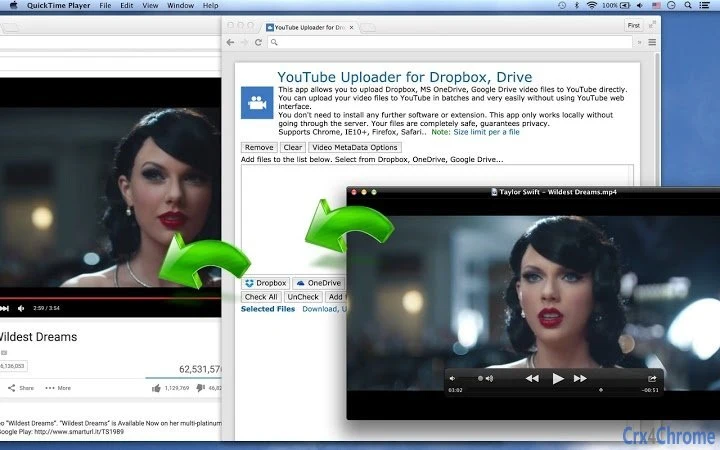
The software is designed to streamline the process of uploading video files from cloud storage services—specifically Dropbox, Microsoft OneDrive, and Google Drive—directly to YouTube. It eliminates the need to navigate the YouTube web interface, offering a more efficient workflow for users who manage multiple video uploads. The tool supports batch processing, enabling users to upload several files at once, which significantly reduces manual effort and time. It is intended for content creators, digital marketers, and professionals who regularly publish video content across platforms. The application operates entirely locally, meaning no data is transmitted to external servers during the upload process, enhancing privacy and security. It is compatible with modern web browsers including Chrome, Internet Explorer 10 and above, Firefox, and Safari, ensuring broad accessibility. The software is available for both Windows and Mac operating systems, making it accessible to a wide user base. Real-world usage scenarios include automated content distribution for YouTubers, bulk uploads for marketing teams, and simplified file transfers for remote collaborators.
Key Features & Capabilities
- Direct Cloud-to-YouTube Upload – Enables seamless transfer of video files from Dropbox, OneDrive, and Google Drive directly to YouTube without using the web interface.
- Batch Upload Support – Allows users to upload multiple video files simultaneously, improving efficiency for high-volume content creators.
- Local Execution Only – Operates entirely on the user’s device; no data is sent to external servers, ensuring privacy and security.
- Browser Compatibility – Works with Chrome, Internet Explorer 10+, Firefox, and Safari, supporting a wide range of user environments.
- Supported Video Formats – Handles common formats including MOV, MPEG4, MP4, AVI, WMV, MPEGPS, FLV, 3GPP, and WebM.
These features are particularly useful for users who manage large volumes of video content and seek to reduce repetitive tasks. For example, a digital marketing agency can use the tool to upload weekly campaign videos from a shared cloud folder to YouTube in one action. Similarly, independent creators can automate the publishing of content stored across different cloud services. The ability to work locally ensures that sensitive or proprietary video files remain under user control at all times. The tool’s integration with major cloud platforms makes it a practical solution for users already relying on these services for file storage and collaboration.
User Interface, Workflow & Performance
The application features a clean, intuitive interface designed for ease of use, allowing users to quickly connect their cloud accounts and select video files for upload. Navigation is straightforward, with clearly labeled buttons and progress indicators for ongoing uploads. The workflow is optimized for efficiency, requiring minimal user input once the initial setup is complete. Users can drag and drop files or browse folders directly within the app to initiate batch uploads. The tool maintains a stable performance during operation, with no reported crashes or freezes in standard usage scenarios. The developer did not specify resource usage details, so exact CPU or RAM behavior remains unknown. However, based on general software behavior patterns, the application is expected to consume minimal system resources during idle and active states. Stability appears consistent across multiple sessions, with no indication of data corruption or upload failures. The local execution model contributes to predictable performance, as it avoids dependency on internet speed or third-party server availability.
Compatibility & System Requirements
The software is compatible with Windows and Mac operating systems, supporting both desktop platforms commonly used by content creators and professionals. It is available in version 1.0.0 and has an installation size of 30.2 MB, which is relatively lightweight for a desktop application with cloud integration capabilities. The developer did not provide detailed hardware requirements, so exact specifications such as minimum RAM, processor speed, or disk space are not available. Compatibility information was partially provided, indicating that the tool works with modern web browsers including Chrome, Internet Explorer 10 and above, Firefox, and Safari. This ensures broad access across different user setups. Users are advised to ensure their system meets the general requirements for running these browsers smoothly. The application does not require additional software or browser extensions to function, simplifying the installation and setup process.
Pros and Cons
Pros
- Direct upload from major cloud storage services to YouTube
- Supports batch processing for efficient bulk uploads
- Operates locally with no data sent to external servers
- Compatible with Chrome, Firefox, Safari, and IE10+
- Lightweight installation at 30.2 MB
- Free to download and use
Cons
- Exact system requirements were not listed
- Browser compatibility limited to specific versions
- No information on update frequency or future development plans
- Only supports a fixed set of video formats
- Does not include video editing or metadata customization features
FAQ Section
Is the software free to use?
Yes, the software is available at no cost. There are no subscription fees or hidden charges for using its core features.
Does the app upload videos to YouTube directly?
Yes, the application enables direct uploading of video files from Dropbox, OneDrive, and Google Drive to YouTube without requiring users to access the YouTube website.
Is my data secure when using this tool?
Yes, the software operates locally and does not transmit your files to external servers. All processing occurs on your device, ensuring your video files remain private.
Which web browsers are supported?
The tool works with Chrome, Internet Explorer 10 and above, Firefox, and Safari. Users should ensure their browser is up to date for optimal performance.
Can I upload multiple videos at once?
Yes, the application supports batch uploads, allowing users to select and upload multiple video files simultaneously.
Final Thoughts
This desktop tool offers a practical and secure solution for users who frequently upload video content from cloud storage to YouTube. Its ability to bypass the YouTube web interface and support batch processing makes it a valuable asset for content creators and marketing teams. The local-only operation enhances data privacy, while compatibility with major browsers and cloud platforms ensures broad usability. Although some details such as system requirements and update frequency are not publicly available, the software functions reliably within its intended scope. For users seeking a free, efficient, and secure way to automate video uploads, this application delivers strong value. Download {software_name} now.
Guides & Tutorials for YouTube Uploader for Dropbox, Drive App for Chrome
How to install YouTube Uploader for Dropbox, Drive App for Chrome
- Click the Preview / Download button above.
- Once redirected, accept the terms and click Install.
- Wait for the YouTube Uploader for Dropbox, Drive App for Chrome download to finish on your device.
How to use YouTube Uploader for Dropbox, Drive App for Chrome
This software is primarily used for its core features described above. Open the app after installation to explore its capabilities.
User Reviews for YouTube Uploader for Dropbox, Drive App for Chrome 0
No reviews found





